A WordPress website can look professional and still struggle to attract organic traffic. The problem may not be the design itself. It could be slow-loading pages, confusing navigation, weak internal linking, indexing issues, unhelpful content or missing conversion tracking.
Quick Answer
An SEO-friendly WordPress website combines helpful, search-focused content with a clear site structure, crawlable pages, descriptive titles and meta descriptions, relevant internal links, optimized images, structured data where appropriate, and good website performance. Regularly monitor indexing and organic search performance using Google Search Console and GA4, then improve the website based on real data.
Building an SEO-friendly WordPress website means creating a site that people can navigate easily and that search engines can crawl, understand and index. It also means helping visitors complete meaningful actions, such as submitting an enquiry, booking a consultation or purchasing a product.
In this guide, we explain how to improve the technical foundation, content structure, performance, on-page SEO and measurement of a WordPress website. The recommendations can be applied to existing WordPress websites as well as new websites built with Bricks Builder.
What you will learn:
- How to check whether your website can be crawled and indexed.
- How to improve page structure, headings, URLs and internal links.
- How to evaluate speed and Core Web Vitals.
- How to implement structured data appropriately.
- How to connect SEO reporting with Google Search Console and Google Analytics 4.
- How to turn organic visitors into qualified enquiries.
1. What Makes a WordPress Website SEO-Friendly?
An SEO-friendly website makes it easier for users and search engines to understand its purpose, access its content and navigate between related pages.
WordPress provides a flexible foundation, but the final result depends on how the website is configured, designed, maintained and populated with content.
The main elements include:
- Technical accessibility: Important pages can be crawled and indexed.
- Content relevance: Each page answers a clear user need.
- Site architecture: Navigation and internal links connect related content.
- Performance: Pages load efficiently and respond well to interactions.
- Mobile usability: Content and functionality work across screen sizes.
- Trust and security: The site uses HTTPS and provides accurate business information.
- Measurement: Search visibility, engagement and conversions are tracked.
No individual plugin, performance score or schema implementation guarantees higher rankings. SEO works best when these elements support a useful and technically sound website.
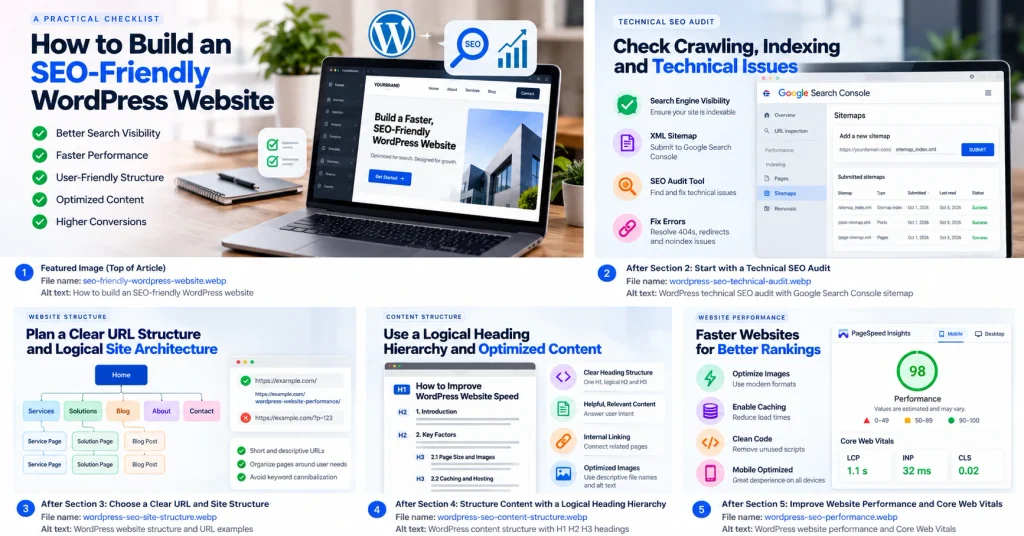
2. Start with a Technical SEO Audit
Before changing your design or publishing more articles, establish whether search engines can access the pages that matter.
2.1 Check Search Engine Visibility
In WordPress, open Settings → Reading and locate the search engine visibility option.
Confirm that “Discourage search engines from indexing this site” is not enabled on your production website.
Also check important URLs for:
- Unexpected
noindexdirectives. - Incorrect canonical URLs.
- Redirect chains or broken redirects.
- Pages returning 404 or server errors.
- Important content blocked by robots.txt rules.
A page being accessible in a browser does not automatically mean that it is eligible for indexing.
2.2 Review Your XML Sitemap
Your XML sitemap should help search engines discover important, indexable URLs.
If you use Yoast SEO, review the sitemap generated by the plugin. Submit the correct sitemap index through Google Search Console and investigate any unexpected indexing issues.
Useful external resource: Google Search Console
2.3 Use an SEO Audit Tool
Tools such as Screaming Frog SEO Spider can help identify technical issues across a website.
Check:
- Broken internal links and response codes.
- Missing or duplicated title tags.
- Missing, duplicated or unclear H1 headings.
- Pages with weak internal linking.
- Canonical and indexing inconsistencies.
- Oversized images and unnecessary redirects.
Prioritize problems according to their impact on important URLs, not simply the total number of warnings.
3. Choose a Clear URL and Site Structure
Descriptive URLs help users understand what a page is about before visiting it.
For example:
- Less descriptive:
example.com/?p=123 - More descriptive:
example.com/wordpress-website-performance/
Use short, meaningful slugs and keep the structure consistent with your website’s information architecture.
3.1 Organize Pages Around User Needs
A service website might use the following structure:
- Service page: Bricks Builder development.
- Solution page: Website performance optimization.
- Supporting article: How to improve WordPress website speed.
- Conversion page: Contact or project enquiry.
Each page should serve a distinct purpose. Avoid creating several pages that target the same intent without offering meaningfully different value.
Implementation tip: Plan URLs, target topics and internal links before publishing a large batch of articles. This helps reduce keyword cannibalization and unnecessary content duplication.
4. Structure Content with a Logical Heading Hierarchy
Headings help readers scan content and help search engines understand its organization.
Use one clear main H1 heading for the article, followed by H2 sections and H3 subsections where needed.
Example:
H1: How to Build an SEO-Friendly WordPress Website
- H2: Technical SEO Foundations
- H3: Check Indexing Settings
- H3: Review XML Sitemaps
- H2: Improve Website Performance
- H3: Optimize Images
- H3: Reduce Unnecessary CSS and JavaScript
- H2: Measure SEO Performance
Use H4, H5 and H6 only when the content genuinely needs additional levels of nesting. Do not add headings merely to reach every heading level, and do not choose a heading tag simply because its default font size looks attractive.
For decorative labels, use paragraphs or styled text instead of unnecessary headings.
5. Improve Website Speed and Core Web Vitals
A fast website makes it easier for visitors to consume content and interact with important elements. Performance is especially important on mobile devices and slower connections.
Google’s Core Web Vitals measure important aspects of user experience:
- Largest Contentful Paint (LCP): How quickly the main content appears.
- Interaction to Next Paint (INP): How responsive the page is to user interactions.
- Cumulative Layout Shift (CLS): How much the layout moves unexpectedly.
The commonly used “good” thresholds are LCP of 2.5 seconds or less, INP of 200 milliseconds or less, and CLS of 0.1 or less, measured at the 75th percentile.
5.1 Optimize Images
Large images can increase page weight and delay the display of important content.
Practical steps:
- Resize images to match their actual display dimensions.
- Use WebP or AVIF where appropriate.
- Compress images without visibly damaging quality.
- Specify image dimensions to reduce layout shifts.
- Use lazy loading for suitable below-the-fold images.
- Avoid lazy-loading the main above-the-fold image when doing so would delay LCP.
5.2 Review CSS, JavaScript and Plugins
On a Bricks Builder website, inspect which styles, scripts and third-party integrations are actually required.
- Remove unused assets where it is safe to do so.
- Avoid installing multiple plugins that perform the same function.
- Review chat widgets, tracking scripts and external embeds.
- Test caching and asset optimization changes individually.
- Recheck menus, forms, tracking and interactive components after optimization.
Do not remove scripts simply because a tool labels them as unused. Confirm that the functionality is genuinely unnecessary.
Test your website: Google PageSpeed Insights
6. Write Content That Satisfies Search Intent
Keyword placement alone is not enough to make a page useful. Your content should solve the problem behind the search.
For example, someone searching for “how to make a WordPress website faster” probably wants a diagnosis and practical fixes, not only a list of hosting providers.
Before writing an article, identify:
- The main question the reader wants answered.
- The reader’s likely level of knowledge.
- The steps or evidence needed to solve the problem.
- The related questions that deserve their own sections.
- The next logical action after reading the article.
Use examples, screenshots, original observations, checklists and clear explanations wherever they add value.
6.1 Improve Readability
Use short paragraphs, descriptive headings, lists and tables when they improve comprehension.
Avoid repeating the same keyword unnaturally or adding sections solely to increase article length. Comprehensive content should be complete and useful, not padded.
6.2 Add Evidence and Practical Examples
Where possible, show how you tested a recommendation, what changed and how the result was measured.
For example, a performance article could document:
- The page and device tested.
- The testing method and date.
- The issue identified.
- The change implemented.
- The before-and-after results.
Do not present illustrative numbers as real client results. Clearly distinguish actual measurements from examples.
7. Build a Strong Internal Linking System
Internal links help visitors discover related information and help search engines understand relationships between pages.
A useful structure for a website agency is:
Problem-solving article → Relevant solution page → Service page → Contact page
For example:
- A speed troubleshooting article links to the website performance solution.
- The performance solution links to the relevant development service.
- The service page provides a clear route to the contact page.
7.1 Use Descriptive Anchor Text
Prefer links such as “website performance optimization” or “Bricks Builder development” when they accurately describe the destination.
Avoid relying entirely on generic phrases such as “click here.” Do not force the exact same keyword into every internal link.
7.2 Create a Linking Checklist
Before publishing an article, check that it:
- Links to relevant existing articles.
- Links to a related solution or service when appropriate.
- Receives links from relevant existing pages.
- Does not link to irrelevant pages just to increase link counts.
- Uses working URLs and meaningful anchor text.
For Bricks Builder Agency, map internal links before writing dozens of articles. This creates a planned route from informational content to relevant business services.
8. Optimize Images and Accessibility
Images should support the content rather than simply fill empty space.
Use descriptive file names and meaningful alternative text for informative images. Decorative images should generally have empty alternative text so assistive technology can skip them.
For a two-column section, place the image on one side and the explanatory text on the other.
Recommended examples:
- A PageSpeed Insights report beside a performance optimization checklist.
- A sitemap or site architecture diagram beside a technical SEO explanation.
- A screenshot of Search Console beside instructions for checking indexing.
8.1 Make Two-Column Sections Responsive
In Bricks Builder, use a reusable layout with two columns on desktop and a single column on smaller screens.
Check that:
- The text remains readable at all widths.
- Images do not overflow their containers.
- The mobile reading order is logical.
- Buttons remain easy to tap.
- The layout does not create horizontal scrolling.
Do not use an image for information that readers need to access as text. Provide the essential explanation in the page content.
9. Implement Structured Data Correctly
Structured data provides machine-readable information about eligible content and entities. It can help search engines understand a page, but adding schema does not guarantee a rich result or improved rankings.
For a typical article, review whether appropriate Article or BlogPosting structured data is present. Also check relevant organization or website markup where appropriate.
9.1 Avoid Duplicate or Contradictory Schema
If Yoast SEO already generates structured data, inspect its output before adding custom PHP snippets or another schema plugin.
Check:
- Whether the schema already exists.
- Whether the page type is appropriate.
- Whether important properties match visible page content.
- Whether custom markup duplicates existing entities.
- Whether the final output passes validation.
Use the Google Rich Results Test to check supported rich-result eligibility and the Schema.org documentation to review vocabulary and properties.
Only mark up information that is genuinely supported by the page.
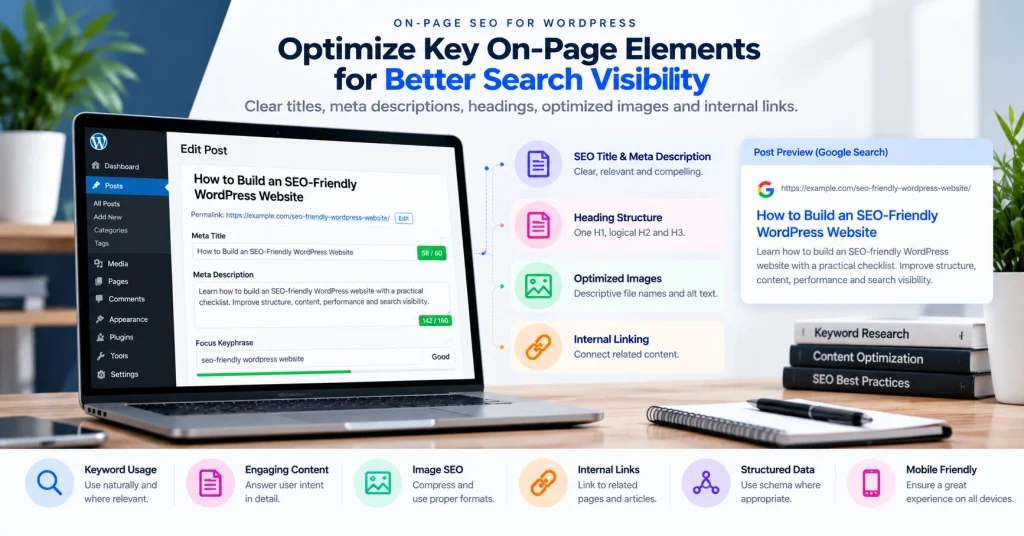
10. Optimize Titles, Meta Descriptions and On-Page Elements
Every important page should have a descriptive title and a clear purpose.
10.1 Write a Specific SEO Title
The title should communicate the page topic accurately and distinguish it from other pages on your website.
For this article, a suitable option is:
SEO-Friendly WordPress Website: Complete Checklist
10.2 Write a Useful Meta Description
A meta description should summarize what readers can learn and why the page is relevant to their search.
For this article:
“Learn how to build an SEO-friendly WordPress website with a practical checklist covering technical SEO, Core Web Vitals, content, schema, internal links and analytics.”
Search engines may generate a different search snippet depending on the query.
10.3 Review Other On-Page Elements
Check the main heading, introduction, image alt text, internal links and relevant terminology. Keep them consistent with the actual content rather than inserting keywords mechanically.
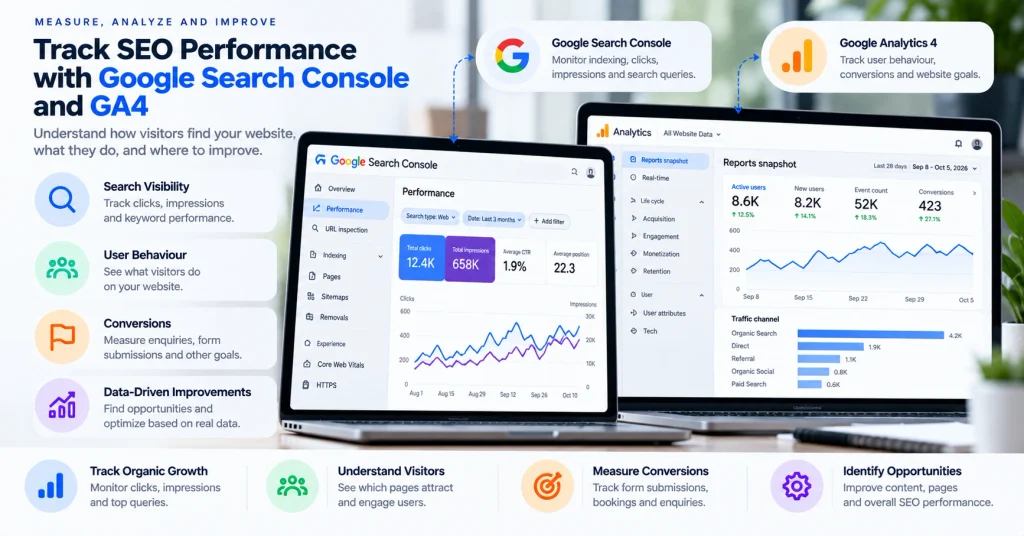
11. Connect Google Search Console and Google Analytics 4
A website is easier to improve when you can measure both search performance and visitor actions.
11.1 Google Search Console
Use Search Console to review:
- Search queries.
- Clicks and impressions.
- Click-through rate.
- Average position.
- Landing pages and country-level performance.
- Indexing and technical reports.
11.2 Google Analytics 4
Use GA4 to understand:
- Landing-page traffic.
- Engagement.
- Traffic acquisition.
- Country and city dimensions where available.
- Key events and lead conversions.
Configure appropriate events for meaningful actions such as successful form submissions or consultation bookings. Test them before relying on the reports.
Search Console and GA4 measure different things, so do not expect their traffic numbers to match exactly.
11.3 Use Google Tag Manager Where Appropriate
Google Tag Manager can help manage tracking tags and events without editing site code for every change.
For a Bricks Builder website, document the tracking implementation and avoid installing duplicate GA4 tags through multiple methods. Validate events using the available debugging and real-time tools.
12. Prepare Useful Content for AI-Assisted Search
Search experiences increasingly include synthesized answers and references to web pages. Creating clear, accurate and well-supported content can make your website more useful to both readers and systems that retrieve information.
Practical recommendations include:
- Answer the main question directly near the beginning of the relevant section.
- Explain technical terms in plain language.
- Support important claims with credible references.
- Publish original tests, examples and case studies where available.
- Use descriptive headings and clear page structure.
- Keep business details, author information and service descriptions consistent.
- Maintain accessible, crawlable pages and avoid hiding essential information behind unnecessary interactions.
There is no guaranteed formula for being cited by ChatGPT, Claude, Perplexity or another AI platform. Treat AI visibility as something to monitor and improve, not a promised outcome.
13. Common WordPress SEO Mistakes to Avoid
Review your website for these preventable problems:
- Publishing pages without a clear purpose or search intent.
- Accidentally blocking important pages from indexing.
- Changing established URLs without appropriate redirects.
- Using several plugins that duplicate the same functionality.
- Adding schema that conflicts with existing structured data.
- Creating many articles that compete for the same topic.
- Publishing oversized images and unnecessary scripts.
- Neglecting internal links to relevant service pages.
- Measuring traffic without checking actual leads or conversions.
- Assuming a good audit score guarantees rankings.
Prioritize issues according to their likely effect on visitors, crawlability, conversions and important landing pages.
Ready to Take Your Website to the Next Level?
From website development and performance optimization to technical SEO and analytics, get expert support to turn your website into a stronger business asset.
No-obligation consultation · Tell us about your project
14. SEO-Friendly WordPress Website Checklist
Use this checklist before launching a new website or completing a major optimization project.
- Important pages are accessible and eligible for indexing.
- XML sitemap is configured and submitted.
- Canonical URLs and redirects are correct.
- Titles, meta descriptions and headings are descriptive.
- Images are compressed and have appropriate alternative text.
- Mobile navigation and page layouts work correctly.
- Core Web Vitals have been evaluated.
- Important pages link to related content and services.
- Structured data has been checked for errors and duplication.
- Search Console and GA4 are configured correctly.
- Important conversion events have been tested.
- Forms, buttons and contact links work.
- Backups, security and updates are managed.
- A process exists for monitoring performance and refreshing content.
15. When Should You Consider Professional WordPress SEO Help?
If your website has persistent technical problems, poor performance, complex migration requirements or difficulty converting visitors into leads, a structured review may help identify the most important issues.
A professional assessment should connect the technical findings to business priorities instead of producing a long list of warnings without context.
Depending on your needs, this could include:
- Bricks Builder website development or redesign.
- WordPress migration and URL preservation.
- Technical SEO and indexing review.
- Website performance optimization.
- Analytics and conversion tracking.
- Ongoing maintenance and monitoring.
Need help with your WordPress website?
Bricks Builder Agency can help assess your website requirements and identify suitable development, performance and SEO improvements.
Explore Bricks Builder services or contact Bricks Builder Agency to discuss your project.
Frequently asked questions
Common questions about building and maintaining an SEO-friendly WordPress website.
How do I make my WordPress website SEO-friendly?
Create useful content that matches search intent, use descriptive page titles and headings, maintain a clear URL structure, improve internal linking, optimize images, and ensure search engines can crawl and index important pages.
Which WordPress SEO plugin should I use?
Choose an established SEO plugin that supports your workflow for titles, meta descriptions, XML sitemaps, canonical URLs, and structured data. Correct configuration and implementation matter more than the plugin name alone.
Does website speed guarantee better Google rankings?
No. Website performance contributes to user experience, but a good performance score does not guarantee rankings. Content relevance, technical accessibility, competition, and other factors also matter.
Is schema markup necessary for every page?
No. Use structured data when an appropriate schema type accurately describes the visible content on the page. Validate the markup and ensure it follows the relevant search engine guidelines.
How long does SEO take to produce results?
There is no universal timeline. Results depend on the website's existing condition, competition, content quality, technical issues, authority, and how search engines process changes. Monitor performance over time rather than relying on a guaranteed deadline.
How often should I audit a WordPress website?
Monitor important technical and performance indicators regularly. Conduct a more comprehensive audit after redesigns, plugin changes, URL migrations, or a meaningful decline in search performance.
Conclusion
An SEO-friendly WordPress website is not created by installing a plugin or achieving a single performance score. It is built by combining useful content, accessible page structure, sound technical implementation, effective internal linking, good user experience and reliable measurement.
Start with the most important issues, document the changes you make and evaluate the results using Search Console, GA4 and suitable testing tools. Then use the findings to improve the pages that matter most to your visitors and business.